

Most dental practice owners evaluate their website by how it looks. Does it feel professional? Does it represent the practice well? Are the photos high quality? These are reasonable things to care about. But none of them predict whether the website actually generates patients.
Page load speed is one of the factors that does. It is also one of the most commonly overlooked, because the person reviewing the website is usually on a fast office WiFi connection and has the site cached in their browser. They never experience what a patient searching on a mobile network actually encounters.
This guide covers what the data says about load time and patient behaviour, what causes slow dental websites, and the specific fixes that produce the fastest improvement.
What the Numbers Say
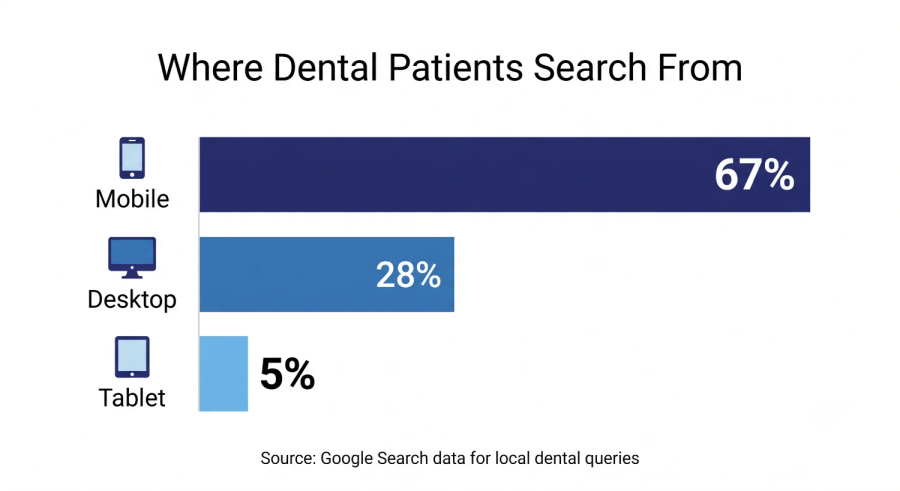
More than 60 percent of dental searches happen on mobile devices. A patient searching for a dentist near me at lunchtime or in the evening is almost always on a phone with a variable mobile connection, not a desktop machine with a hardwired network. The experience they have on your website is determined by how your site performs under those conditions.
Google's research shows that the probability of a patient leaving your site before it fully loads increases by 32 percent when load time goes from one second to three seconds. At five seconds it increases by 90 percent. At ten seconds it more than triples. Most dental websites load in five to eight seconds on a mobile connection. Most of those patients are gone before they see a single page.
Beyond patient behaviour, page load speed is a direct Google ranking factor. A slow website ranks lower in both organic results and in the factors that support Map Pack visibility. The performance penalty is applied twice: fewer patients visit and fewer still make it from the search results to an actual call.
What Makes Dental Websites Slow
Uncompressed Photography
Dental websites rely heavily on photography. Office interiors, team headshots, before and after cases, and hero images are all standard features. The problem is that these images are often uploaded in their original file sizes, which can be five to fifteen megabytes each. A homepage with four or five uncompressed images can require fifty megabytes of data to load. On a mobile connection, that is minutes, not seconds.
The fix is image compression before upload. Tools like Squoosh or TinyPNG reduce image file sizes by 60 to 80 percent without visible quality loss. Every image on your website should be compressed before it goes live, and existing images should be replaced with compressed versions as a priority fix.
Video Backgrounds and Sliders
Autoplay video backgrounds and image sliders are among the most performance-damaging design choices on dental websites. They require large file downloads that begin as soon as the page loads, regardless of whether the patient ever scrolls to see them. They also frequently have accessibility issues and perform poorly on mobile.
The patient behaviour data does not support them either. Sliders are rarely interacted with. Autoplay videos are muted by default on most mobile browsers, making them decorative at best. Replacing them with a single static hero image that loads in under half a second typically improves both performance scores and conversion rates simultaneously.
Unoptimised Hosting
Many dental websites are hosted on shared servers through providers that prioritise low cost over performance. Server response time is the baseline that determines how fast your site can load regardless of how well everything else is optimised. A host with slow server response times creates a ceiling on your performance that nothing on your end can fix.
Managed WordPress hosting from providers with dental or healthcare clients, or a modern static site deployment platform, typically delivers sub-200 millisecond server response times compared to the 500 to 2000 millisecond responses common on budget shared hosting.
Too Many Third-Party Scripts
Every third-party tool embedded on your website, chat widgets, appointment booking tools, analytics tags, retargeting pixels, and review widgets, adds script loading time. Each script can add 200 to 500 milliseconds to your load time independently. Five or six tools on the same page can add three or more seconds before a single element of your actual content appears.
Audit what is loading on your site. Remove any scripts that are not actively driving value. Load the rest asynchronously so they do not block the main page content from appearing first.
How to Check Your Current Speed
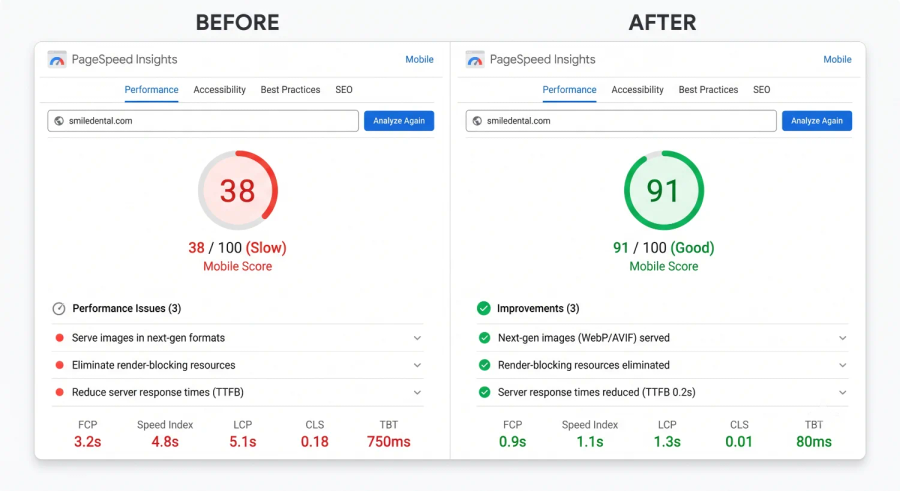
Go to Google PageSpeed Insights and enter your website URL. Run it on mobile, not desktop. The mobile score is what matters for dental patient searches. A score below 60 indicates significant performance problems. A score below 40 means patients are almost certainly leaving before your site finishes loading.
The tool shows you the specific issues dragging your score down, ranked by their impact. Focus on the top three issues first. Fixing the largest problems produces the most immediate improvement.
Want to know exactly how your website is performing for patients?
Get a free website and SEO audit from ClickWave
Frequently Asked Questions
What is a good page load time for a dental website?
Under two seconds on a mobile connection is the target. Under three seconds is acceptable. Above three seconds and you are losing a meaningful percentage of potential patients before they ever see your content.
Does my website speed affect my Google Maps ranking?
Indirectly yes. Google considers your linked website as part of the overall assessment of your practice's online presence. A slow, poorly performing website creates a negative signal that contributes to weaker Map Pack performance alongside the more direct factors like GBP completeness and review velocity.
Is a website rebuild necessary to fix speed problems?
Not always. Image compression, hosting upgrades, and script removal can dramatically improve performance on an existing site. If the underlying platform is a particularly slow page builder or the site architecture is fundamentally flawed, a rebuild may be the most efficient path. A performance audit will tell you which situation applies.
My website looks the same as before on my computer. How do I know if it is slow for patients?
Your browser caches your website after the first visit, which means subsequent loads appear instant. And your office WiFi is significantly faster than a mobile network. Always test your site using Google PageSpeed Insights on the mobile setting, using an incognito browser window to avoid cached results.